Software Development Risk Management Explained
A practical guide to software development risk management. Learn to identify, analyze, and mitigate risks to keep your software projects on track.

Think of software development risk management as your project's GPS and emergency kit all rolled into one. It’s the process of looking ahead, spotting potential roadblocks—like creeping project scope, technical debt, or team conflicts—and figuring out how to handle them before they throw your schedule and budget off a cliff. This isn't just about creating extra paperwork; it’s about turning uncertainty into a strategic advantage.
Why Managing Risk in Software Projects Matters
The diagram above gives you a sense of how a structured approach to risk management touches every part of a project, paving the way for a successful outcome. Honestly, solid risk management is often the single biggest difference between projects that sail smoothly and those that sink under pressure.
Without it, even the most brilliant development team is stuck in a reactive loop, constantly putting out fires instead of focusing on building great software. That firefighting mode isn't just stressful; it's a massive drain on time and money.
The High Cost of Ignoring Risks
Simply hoping for the best doesn't work. Ignoring risks is like pretending you don't hear a rattling noise in your car's engine—it only guarantees the problem will show up at the worst possible time. The fallout from poor risk management can be devastating, leading to blown budgets, missed launch dates, and a tarnished reputation.
A classic, sobering example is the 2016 Wells Fargo scandal. Their fragmented risk management and lack of proper controls allowed employees to open millions of unauthorized accounts. This failure ultimately cost the company around $3 billion USD in fines and settlements. While not a pure software project, it's a powerful lesson in what happens when systemic risks are ignored. You can read more about how disconnected systems play a role in major failures in recent risk management trend analyses.
By proactively identifying and planning for what could go wrong, you empower your team to maintain control, adapt to change, and consistently deliver high-quality software on schedule.
Building a Proactive Defense
Embracing a risk management mindset fundamentally changes your team's approach from crisis management to strategic planning. Instead of waiting for things to break, you actively look for potential weak points right from the start. This is absolutely critical during the early planning stages when key decisions and assumptions are being made.
This structured thinking pays off in several big ways:
- Improved Predictability: You get a much clearer, more realistic view of your project timeline and budget because you've already accounted for potential bumps in the road.
- Enhanced Decision-Making: Armed with an understanding of potential upsides and downsides, your team can make smarter, more confident choices.
- Increased Stakeholder Confidence: Nothing shows clients and leadership you're in control like a well-thought-out plan for handling uncertainty.
When you bake risk assessment into the very beginning of a project—especially the discovery phase—you set the entire effort up for success. A well-run project discovery phase is the perfect time to start mapping out these potential issues. This guide will give you the practical steps to make risk management your project's secret weapon.
Your Four-Step Software Risk Management Framework
To build a strong defense against project threats, you need a repeatable game plan. A solid software development risk management framework isn't about creating more bureaucracy; it's a simple, logical cycle that turns chaos into order. It's how you systematically find, understand, and deal with potential problems before they become full-blown disasters.
This visual shows the continuous loop of risk management—a cycle of identifying, planning, and monitoring that protects your project from start to finish.
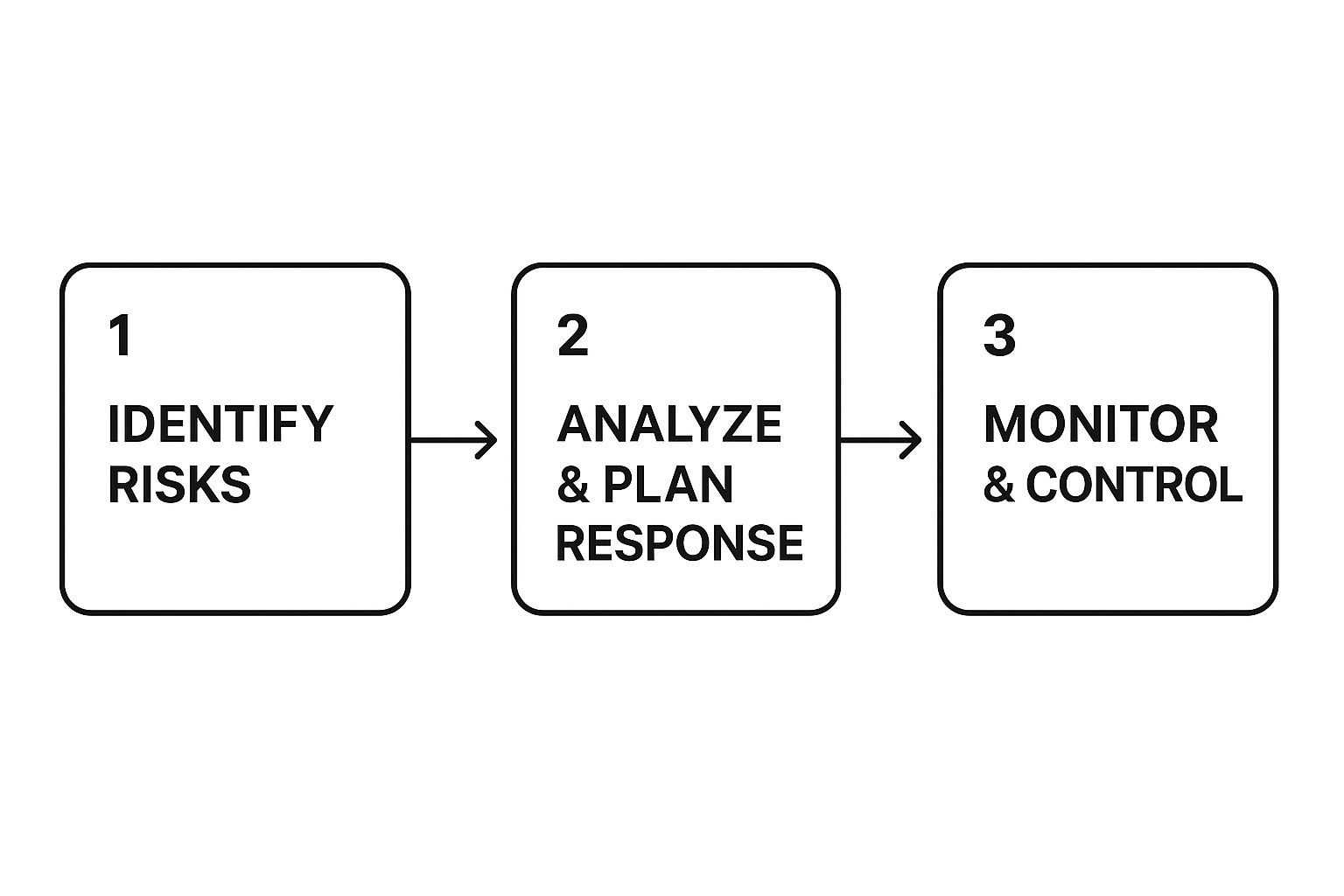
This flow really drives home that managing risk isn’t a one-and-done task. It's an ongoing effort that has to adapt as your project moves forward. Let's break down each step of this crucial framework.
Step 1: Identify Potential Risks
You can't solve a problem you don't know exists. The first step is to put on your detective hat and uncover every possible threat that could derail your project's timeline, budget, or quality. And this isn't a solo mission for the project manager; it's an all-hands-on-deck activity.
Get your team, key stakeholders, and even clients in a room for a brainstorming session. Encourage everyone to think about what could go wrong, no matter how small or unlikely it seems. The goal here is quantity. You can filter and prioritize everything later.
To get the ball rolling, think about these common areas of risk:
- Technical Risks: Will this shiny new technology actually play nice with our old legacy systems? Is our database going to crumble under the weight of our projected user load?
- People Risks: What happens if our lead developer quits halfway through the project? Does the team even have the skills to work with this new framework?
- Process Risks: Are our deployment procedures really solid? Is our communication with the client clear enough to prevent major misunderstandings down the road?
Every risk you identify should be logged in a central place, which we often call a risk register. This can start as a simple spreadsheet, but it will grow into your command center for tracking and managing threats.
Step 2: Analyze and Prioritize
Okay, now you have a long list of potential problems. The next step is to figure out which ones actually matter. Not all risks are created equal—some are minor bumps in the road, while others are project-ending sinkholes. Your job is to tell the difference.
This analysis usually comes down to two simple questions:
- Probability: How likely is this thing to actually happen? A simple low, medium, or high scale is perfect for this.
- Impact: If it does happen, how bad will the damage be? Again, think in terms of low, medium, or high.
A risk with high probability and high impact (like a critical server failure with no backup) needs your immediate attention. On the other hand, a risk with low probability and low impact (like a minor UI bug on a rarely used screen) can wait.
This simple act of prioritization is what transforms a long, overwhelming list of fears into a focused, actionable plan. It stops the team from chasing ghosts and makes sure the biggest threats get handled first.
Step 3: Plan Your Response
With your risks identified and prioritized, it's time to decide what you’re going to do about them. For every significant risk, you need a clear response plan. This is the proactive step that separates successful projects from those that are always putting out fires.
You generally have four ways to handle a risk:
- Avoid: Change your plan to eliminate the risk completely. For instance, if using an unproven new technology feels risky, you might switch to a more stable, battle-tested alternative.
- Mitigate: Take steps to reduce the chances of the risk happening or lessen its impact if it does. A classic example is implementing a tough QA process to mitigate the risk of critical bugs making it to production.
- Transfer: Shift the responsibility for the risk to someone else. This is what you're doing when you buy insurance or outsource a particularly tricky component to a specialized vendor.
- Accept: For some low-priority risks, the smartest and most cost-effective move is to just live with it. You should still have a backup idea in mind, but you’re consciously deciding not to take immediate action.
Step 4: Monitor and Control
Finally, remember that risk management is a marathon, not a sprint. You can’t just set it and forget it. Throughout the project, you need to keep an eye on your known risks and constantly scan the horizon for new ones. A minor issue last month could easily become a major blocker next week.
Assign an "owner" to each important risk. This is the person responsible for tracking it, kicking the response plan into gear if needed, and keeping everyone updated. Regular risk review meetings—maybe as part of your weekly team sync—are absolutely essential. This keeps risk front and center, ensuring your plans stay relevant as the project evolves.
2. Identifying Common Software Development Risks
Before you can manage risk, you have to know what you're looking for. It's a bit like a seasoned mechanic who can hear a faint engine noise and know exactly which part is about to fail. Experienced development teams have that same knack for spotting the classic problems that can derail a project.
The best way to do this is to organize potential issues into categories. Thinking about risks in buckets—like Technical, Project Management, People, and External—turns a vague sense of dread into a structured checklist. It helps you scan your project for weak spots without getting lost in the weeds.
Unpacking Technical Risks
These are the risks that live inside the technology itself—the code, the architecture, and the tools you use every day. They're often the first things developers think about because they're so close to the work.
A classic example is technical debt. This is what happens when you take a shortcut to hit a deadline, knowing you'll have to come back and fix the messy code later. It feels like a win at the moment, but that "debt" gathers "interest" over time, making every future change slower and more likely to break something.
Other major technical headaches include:
- Integration Challenges: You assume two systems will talk to each other, but they don't. Getting APIs and third-party services to play nicely can burn days, or even weeks, of unplanned work.
- Performance Bottlenecks: The app runs beautifully with five testers. But what happens when 5,000 real users log in at once? If you haven't planned for scale, you're headed for a crash.
- Security Vulnerabilities: A single security hole can expose sensitive user data, destroy your company's reputation, and land you in serious legal trouble.
Analyzing Project Management Risks
These risks have less to do with code and more to do with how the project is run. We're talking about schedules, budgets, communication, and the fundamental process of getting work done. A technically brilliant team can still fail if the project is managed poorly.
The most infamous risk here is scope creep. It starts innocently enough with a client asking for "just one more small feature." But when that happens over and over, the original timeline and budget are completely blown.
A well-defined scope is your project's North Star. Without it, the team is adrift, constantly changing direction and never reaching a clear destination. This lack of focus is a primary driver of project failure.
Keep an eye out for these other management traps:
- Unrealistic Deadlines: Optimistic timelines force teams to rush, which leads to burnout, sloppy work, and a product that nobody is proud of.
- Poor Communication: When stakeholders aren't aligned or developers don't have a clear picture of what to build, you end up with constant rework.
- Inadequate Resource Planning: Realizing you don't have the right person or tool for a job after you've started is a surefire way to grind all progress to a halt.
Understanding People Risks
Your team is your greatest asset, but people bring their own set of risks. These issues pop up from team dynamics, skill gaps, or just plain old life getting in the way.
One of the scariest people risks is losing a key developer. If only one person understands a critical piece of the system—a situation with a "bus factor" of one—their departure can leave the team totally stranded. The project stalls while everyone scrambles to figure out what they knew.
Acknowledging External Risks
Finally, there are the risks that come from outside your building. These are factors you can't really control, like market shifts, vendor problems, or new regulations. You can't stop them, but you can definitely prepare for them.
A perfect example is a third-party service failure. If your app relies on an external API for payments and that service goes down, your app is effectively broken. Another common one is a vendor you depend on going out of business or suddenly tripling their prices. It happens.
Even a change in government regulations can force you to drop everything and make expensive, unplanned updates to your software. Knowing who and what you depend on is the first step to building a project that can withstand a few surprises.
To bring this all together, here’s a quick look at some common risks and where you might start with mitigation.
Common Software Development Risks and Initial Mitigation Strategies
| Risk Category | Specific Risk Example | Potential Impact | Mitigation Idea |
|---|---|---|---|
| Technical | High Technical Debt | Slower future development, increased bugs | Schedule regular "refactoring sprints" to pay down debt |
| Technical | Security Vulnerability | Data breach, loss of user trust, legal fees | Implement automated security scanning (SAST/DAST) tools |
| Project Management | Scope Creep | Missed deadlines, budget overruns | Create a formal change request process for all new features |
| Project Management | Poor Communication | Rework, low team morale, missed requirements | Hold daily stand-up meetings and regular stakeholder demos |
| People | Key Developer Leaves | Project delays, knowledge loss | Encourage pair programming and maintain thorough documentation |
| External | Third-Party API Failure | Core application functionality breaks | Build in fallback logic or have an alternative service provider |
This table isn't exhaustive, of course, but it highlights how categorizing risks helps you connect a potential problem directly to a concrete, preventative action.
Proven Strategies for Mitigating Project Risks
Once you've mapped out your project's risks, the real work begins. It's time to decide what to actually do about them. This is where your risk management plan moves from a document full of "what-ifs" to a concrete action plan. Simply listing your worries isn't enough; you need a playbook for how to respond when things get messy.
There are four core strategies for handling risk. Think of them as the four fundamental plays you can run to protect your project. Which one you choose depends on the risk's likelihood, its potential damage, and what your team can realistically handle.
The Avoidance Strategy
The most straightforward approach is to get the risk off the table completely. Risk Avoidance is all about changing your plan to sidestep a threat entirely. You're not just ignoring it—you're making a strategic move so the risk can no longer affect you.
For example, let's say your team is considering a flashy new JavaScript framework that's still unproven. The risk of hitting show-stopping bugs with no community support is high. To avoid this, you could simply choose a stable, well-supported technology your team already knows inside and out. Just like that, the risk is gone.
The Transference Strategy
Sometimes, the best person to handle a risk doesn't work for you. Risk Transference is the art of shifting the responsibility and the financial fallout of a risk to a third party. The risk doesn't vanish, but you're passing the burden to someone better equipped to deal with it.
A classic example is outsourcing a complex feature, like a payment gateway, to a specialized vendor who lives and breathes that stuff. Another common form of transference is buying cybersecurity insurance. If a data breach happens, the insurance company absorbs the financial hit, not you.
This strategy is a lifesaver for risks that demand niche expertise or carry a price tag that's too steep for your company to handle alone.
The Mitigation Strategy
Most of the time, you'll find yourself mitigating risks. Risk Mitigation means taking direct action to either reduce the chances of a risk happening or lessen its impact if it does. You aren't eliminating the threat, but you're taking the sting out of it. It’s proactive problem-solving at its best.
This strategy is baked right into good software development habits:
- Building Prototypes: A small proof-of-concept can snuff out the technical risk of a new architectural idea before you commit.
- Implementing Code Reviews: Getting a second set of eyes on code is a simple way to drastically reduce the odds of critical bugs making it to production.
- Adopting Agile Methods: Working in short sprints helps your team adapt to changes on the fly. This mitigates the huge risk of spending months building the wrong thing. Scope creep is a constant threat here; learning about mastering project scope creep is key to keeping projects lean and focused.
Security is another huge area for mitigation. A staggering 97% of commercial apps contain open-source components, which can open the door to all sorts of vulnerabilities. With organizations taking an average of 49 days just to spot a cyberattack, you can't afford to be reactive.
Mitigation is about building a resilient project. It's the equivalent of installing smoke detectors and fire extinguishers—you hope you never need them, but you’re prepared if a fire breaks out.
By implementing robust software quality assurance processes, you're essentially mitigating a whole host of technical risks from the very start.
The Acceptance Strategy
Finally, there are some risks you just have to live with. Risk Acceptance is a deliberate choice to do nothing about a risk right now. This isn't negligence; it's a calculated decision reserved for risks that have a tiny chance of happening, would have a minor impact, or would cost more to fix than the problem itself.
Imagine your team discovers a minor UI glitch on an ancient, obscure web browser. Seeing as less than 0.1% of your users are on that browser, you might formally accept the risk. You’d log the decision and maybe have a quick fix ready just in case, but you won't pull a developer off a critical feature to work on it. Acceptance is a perfectly valid strategy, as long as you're making the choice with your eyes wide open.
Choosing the Right Tools for Modern Risk Management

Let's be honest: trying to manage project risks using a jumble of spreadsheets and mile-long email threads is just asking for trouble. Details slip through the cracks, nobody knows which version is the right one, and getting a clear picture of what's going on feels impossible.
Modern software development demands something better. You need a set of tools that brings everything together, handles the repetitive grunt work, and gives you a live, honest look at the threats facing your project.
The right tech stack turns risk management from a dreaded administrative headache into a smooth, integrated part of your daily routine. It creates a single source of truth so that everyone, from the newest developer to the lead stakeholder, can make smart decisions based on what’s actually happening.
This isn't just a nice-to-have; it's where the industry is heading. The market for risk management software is already worth over USD 13.05 billion and is expected to nearly double by 2030. Why the boom? Teams need better tools to handle cybersecurity threats, maintain operational control, and meet tough compliance standards. You can get a deeper dive into this market's rapid expansion.
Project Management Platforms with Risk Features
You probably don't need a dedicated, expensive tool right out of the gate. The project management software your team already uses likely has some powerful risk-tracking features built right in.
- Jira: It’s easy to create a custom issue type called "Risk." You can add fields for things like probability and impact, then track these risks on a Kanban board just like you would any other task. This puts risk front and center during sprint planning and daily stand-ups.
- Asana: You can build a surprisingly effective risk register using custom fields and a dedicated project section. Assigning owners and deadlines to mitigation tasks makes it crystal clear who is responsible for what.
Starting with your existing tools is a great way to get going. It keeps everything in one familiar place and makes it easier for the whole team to get on board.
The goal isn't just to list risks; it's to make them visible and actionable. Integrating risk tracking directly into your team's primary workspace ensures that potential threats are never out of sight or out of mind.
Specialized Risk Management and Security Tools
As your projects get bigger and more complex, you might outgrow the basics. That's when specialized risk management platforms come in. They offer advanced features like quantitative analysis, automated reports, and tools for mapping to compliance standards—perfect for when you need a more formal, auditable process.
Security, in particular, is one area that demands its own specialized toolkit. You absolutely have to build these tools into your development pipeline to protect your software and your users.
- Static Application Security Testing (SAST): Think of these tools as a spell-checker for security flaws. They scan your source code for common vulnerabilities before you even compile it, catching problems early.
- Software Composition Analysis (SCA): Modern applications are built on a mountain of open-source libraries. SCA tools scan all those dependencies for known security holes, so you don't accidentally inherit someone else’s problems.
Beyond these specific tools, looking into broader workflow automation can make tracking and reporting on risks much more efficient. By building the right tech stack, you create a system where risk management isn't an afterthought but a continuous and collaborative process.
Weaving Risk Management into Your Agile Workflow
There's a popular myth that formal risk management is too rigid for the fast-paced world of Agile. The argument is that because Agile is so adaptable, planning for risks ahead of time is a waste of energy. The truth is actually the opposite. Agile and risk management aren't just compatible—they make each other better.
Agile doesn't get rid of risk; it just changes how you handle it. Instead of a huge, one-time analysis at the start of a project, you manage risk continuously in small, bite-sized chunks. This approach makes your software development risk management far more responsive and bakes it right into your team's daily routine. The goal is to make talking about risks as normal as writing a user story.
Integrating Risk into Agile Ceremonies
The beauty of this is you don't have to invent a bunch of new meetings. You can simply weave lightweight risk management activities into the Agile ceremonies your team already does every single week. This makes the whole process feel natural, not like another chore piled on top of everything else.
Here’s a practical look at how it works:
- Sprint Planning: While your team is discussing the user stories for the next sprint, just ask a simple question: "What could get in our way here?" This is a great way to uncover potential risks tied to tricky tech, vague requirements, or reliance on other teams.
- Daily Stand-ups: Think of these as your early warning system. When someone flags a blocker or a surprise issue, that's a new risk popping up in real time. This keeps everyone on the same page about immediate threats.
- Sprint Retrospectives: This is the perfect time to look back at what went wrong in the last sprint. Did a server crash? Was there a miscommunication with a stakeholder? These are risks that actually happened. Talking about them helps the team learn and figure out how to prevent them next time.
By building these conversations into your existing workflow, you can learn more about how to refine your team’s process with agile development best practices.
Visualizing Risks with Agile Tools
To make risks feel real, you have to see them. Why not track them just like you track your development work? Applying concepts from the Agile playbook makes risk tracking second nature for the whole team and gets those risks out of a dusty spreadsheet nobody ever looks at.
A "Risk Backlog" or a "Risk Board" works exactly like your product backlog. It’s a prioritized list of threats the team can see, talk about, and tackle, making risk management a shared and transparent responsibility.
You could even create a Risk Burndown Chart. It’s just like a sprint burndown chart but for risks. It tracks the number or severity of unresolved risks over time, giving everyone a clear picture of how well the team is chipping away at its exposure. When risk is a visible part of the sprint, it becomes a problem the entire team wants to solve together.
Frequently Asked Questions
Let's be honest, diving into risk management for software projects can feel a bit overwhelming. You're not alone. Here are some straightforward answers to the questions we hear most often, designed to clear things up and help you put these ideas into practice.
What Is the First Step in Software Development Risk Management?
The absolute first step is always Risk Identification. It’s a simple but powerful idea: you can't manage a risk you haven't identified.
This is all about getting your team together to proactively brainstorm what could go wrong. Think about everything that might derail your project's schedule, budget, or quality. We often kick this off with workshops, one-on-one interviews with key stakeholders, and even digging through documents from old projects to see what tripped up teams in the past.
A great way to start is by building a simple checklist covering common risk areas like technical challenges, operational hiccups, or even external market shifts. It helps make sure nothing obvious gets missed.
How Does Risk Management Differ in Agile vs. Waterfall?
The mindset and mechanics are completely different. With a traditional Waterfall project, risk management is a huge, front-loaded activity. You'll spend a ton of time in the initial planning phase creating a massive risk document, which then gets formally reviewed at major project gates. It’s very structured and predictive.
Agile, on the other hand, treats risk management as an ongoing conversation. It’s continuous and baked right into the rhythm of your sprints. Risks are identified and discussed in small, manageable chunks during sprint planning or retrospectives. The whole point is rapid adaptation to new challenges as they pop up, rather than trying to predict every possible problem from day one.
What Is a Risk Register, and Do I Really Need One?
Think of a risk register as your single source of truth for all potential project threats. It’s a living document—often just a spreadsheet for smaller projects—where you log each risk, analyze its potential impact, and track how you plan to deal with it. For bigger, more complex projects, teams might use specialized software.
Is it always necessary? For a tiny, two-person project, maybe a formal register is overkill. But documenting risks in some way is non-negotiable.
It's about accountability and memory. Writing things down ensures that potential problems don't get forgotten in the daily hustle. It gives you a clear way to communicate with stakeholders and makes it obvious who is responsible for watching each specific threat. Even a basic list can prevent a critical issue from slipping through the cracks.
Ready to build high-performance web applications without the risk? The expert teams at 42 Coffee Cups specialize in delivering scalable solutions and seamless team augmentation, helping you accelerate growth and reduce development costs. Start your project with us today.